
XZA Wood Turning
  • 3-Axis
  • Used in Router and Lathe CNC machines
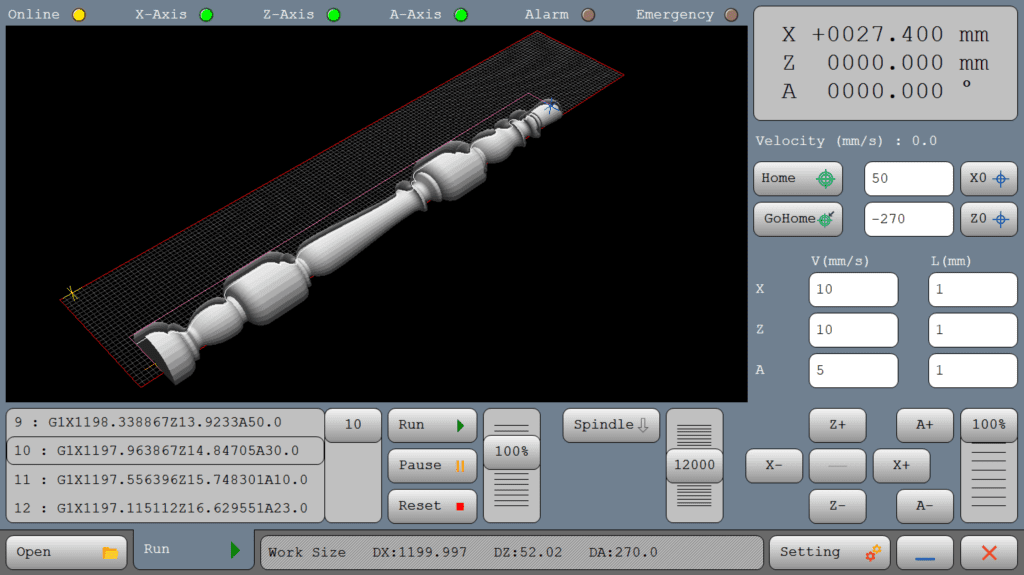
XZA Wood Turning CNC interface showing 3D spindle simulation with X, Z, and A-axis controls for precise wood lathe operations

DESCRIPTION

The XZA-Woodturning interface incorporates an A-axis, which is controlled via G-code. This axis is essential for complex operations and allows for rotational movements around the X-axis. In this setup, the A-axis functions as a pivotal component in controlling how the workpiece is manipulated, enabling precise angular cuts and detailed profiling.
In this machine, the controller plays a critical role by sending pulses and direction signals to the A-axis. This allows for exact control over the rotation, aligning the movements meticulously with the G-code instructions to produce precise and intricate designs.

XZA Router/wood turning
  • 3-Axis
  • Used in Cutting CNC machines

Introduction

One-line value prop: Import a 2D DXF profile, preview the finished spindle in 3D, and machine it on an X–Z lathe with A-axis rotation — with forward, backward, or bi-directional loading.

Who uses it: Furniture & stair manufacturers, architectural millwork shops, custom wood-turners, prototyping labs, makerspaces, and vocational/edu programs.
Works with: XZA lathes (X, Z linear + A rotary), stepper or servo drives, VFD spindle control, manual/pneumatic tailstock, single-tool or router-based cutting heads.
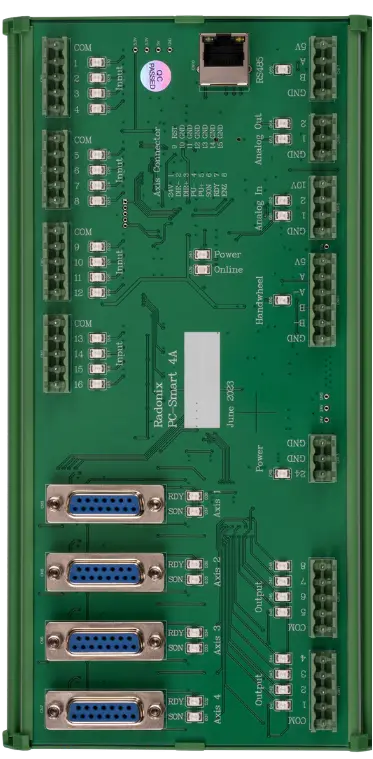
Compatible controllers: PC-SMART 4A / PC-SMART 3AS / PC-PRO LAN 4A

Supported files: DXF and standard G-code (e.g., ArtCAM / PowerMill posts)

Machine & Kinematics

  • X–Z carriage with A-axis workpiece rotation.

  • Homing routines, soft limits, SafeZ retracts, and configurable work envelope.

  • Forward, backward, or both-direction loading for efficient rough/finish strategies.

Control & I/O

  • High-rate step/dir motion with look-ahead planner.

  • I/O mapping for spindle on/off, analog 0–10 V RPM, tailstock clamp, guards, beacons, and full E-stop chain.

  • Safety interlocks: door/guard, over-travel, emergency, spindle/air pressure checks.

Software & Workflow

  • Direct DXF execution (no external post); automatic revolve to 3D preview.

  • Set Z step-down, pass count, cut direction (FWD/BWD/Both), feed (mm/s), and spindle RPM.

  • Dry-run (spindle off), single-block, and restart from line for power-loss recovery.

  • Quick positions P1/P2, program origin tools, and stock alignment helpers.

  • Job logging: cycle time, path length, passes, pauses/restarts, operator notes.

Key Capabilities
(at a glance)

Key Capabilities(at a glance)

  • DXF-to-turning with true 3D result preview

  • Multi-pass roughing/finishing with programmable step-down

  • Forward / backward / both-direction machining modes

  • VFD RPM control, SafeZ retracts, and dry-run verification

  • Resume from pause & restart from any line

Standard Workflow

  1. Home X, Z, A; set SafeZ and P1/P2.

  2. Load DXF, review auto-revolved 3D preview.

  3. Enter step-down, pass count, direction, feed, and RPM.

  4. Dry-run to confirm limits and clearance; adjust if needed.

  5. Run and monitor; pause for inspection or chip clearance.

  6. If interrupted, restart from the last executed line; save report & notes.

Untitled design 2025 07 12T015349.626 1

Typical Specifications

Area Spec
Axes X, Z + A (rotary spindle)
Modes DXF revolve to 3D, multi-pass rough/finish, RPM control
Files DXF (primary), G-code (optional)
Piercing N/A → Turning: step-down, pass count, direction (FWD/BWD/Both)
Compensation Junction smoothing, velocity planning, SafeZ retracts
Alignment P1/P2 quick points, origin tools, 3D preview verification
Safety Guard/door, spindle ready, tailstock clamp, E-stop, SafeZ
Recovery Restart from last line; safe RPM and clearance restore
Reporting Time, path length, passes, pauses/alarms, notes

Key Features of Radonix CNC Software

🔹 Direct DXF Execution

Seamlessly load and execute DXF files without the need for G-code conversion — streamlining your workflow and reducing setup time.

🔹 Smart Component & Path Management

Select specific parts from complex drawings and customize cutting order with intuitive control over toolpath sequencing.

🔹 Interactive On-Screen Editing

Scale, rotate, and mirror parts directly within the interface — with live toolpath previews to ensure precision.

🔹 Flexible Part Placement

Manually drag and drop parts onto your material sheet to accommodate irregular shapes, pre-cut stock, or remnant reuse.

🔹 Advanced Pause Controls

Set up to three independent pause points — before the cut, during the cut, and after the cut — for manual checks or operational adjustments.

🔹 Reverse Cutting Mode

Execute toolpaths in reverse to minimize material warping or adjust final exit points based on design needs.

🔹 Display of the final workpiece in three dimensions.


🔹Ability to select the loading direction in the forward, backward, or both directions.