
- 2-Axis
- Used in Car Ring Polishing CNC machine
- Feature: Sureface Scan
DESCRIPTION
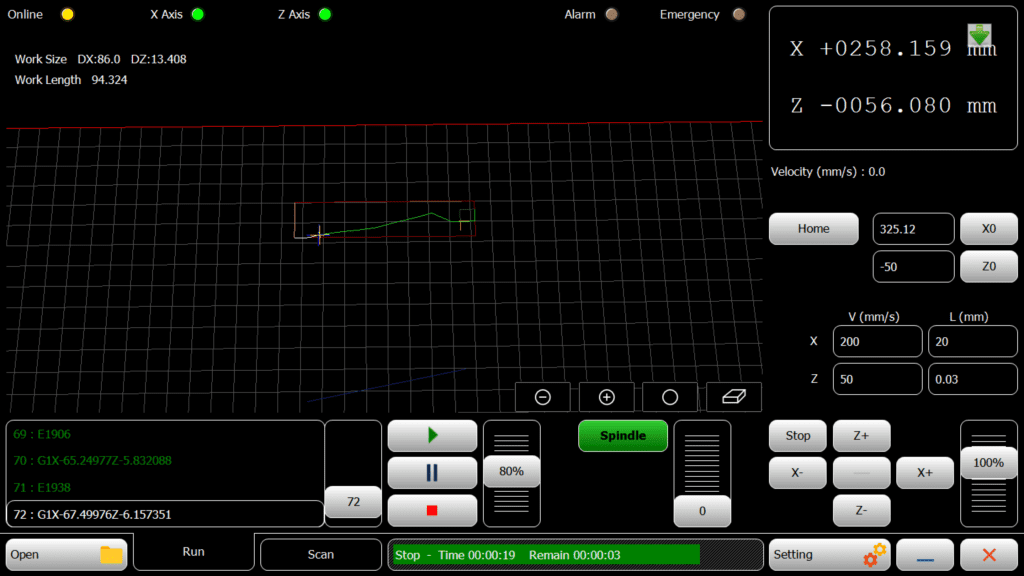
The XZ-Ring CNC interface designed for polishing car rings incorporates advanced features that enhance precision and efficiency in automotive manufacturing. Equipped with a rotary axis controlled by G-code, the system allows for complex and detailed surface finishes on metal rings. It features probes and surface detection technologies capable of assessing the topography of the rings, detecting curves, and identifying any deviations in surface smoothness. This feedback is utilized to adjust the CNC tool paths in real-time, ensuring that each cut is consistent and accurate, irrespective of surface irregularities.
This adaptive approach, facilitated by the interface’s integration with diamond tools for polishing, not only increases the aesthetic appeal of car rings but also ensures high-quality finishes crucial for both decorative and functional automotive components.
- 2-Axis
- Used in Cutting CNC machines
Introduction
One-line value prop: Restore diamond cutting wheels to true geometry with scan-to-path repair, controlled depth passes, and safe, guided operation.
Who uses it: Alloy wheel refurbishment shops · automotive dealerships & service centers · tire retailers · collision/body repair shops · wheel
Works with: X-Z ring lathes or repair rigs with rotating spindle and linear X/Z slides (grinding/diamond dressing tool).
Compatible controllers: PC-SMART 4A / PC-SMART 3AS / PC-PRO LAN 4A
Supported files: DXF profile or on-machine Scan to generate the repair path
Machine & Kinematics
X–Z slides around a rotating wheel/spindle; configurable work envelope, homing and soft limits for repeatable setups.
Supports surface detector/probe for automatic edge finding and profile scan.
Fast origin tools (Home, X0, Z0) and per-axis jog (X±, Z±) for quick alignment.
Control & I/O
Spindle start/stop with speed ramp (Start/End RPM); on-screen Speed 100% override.
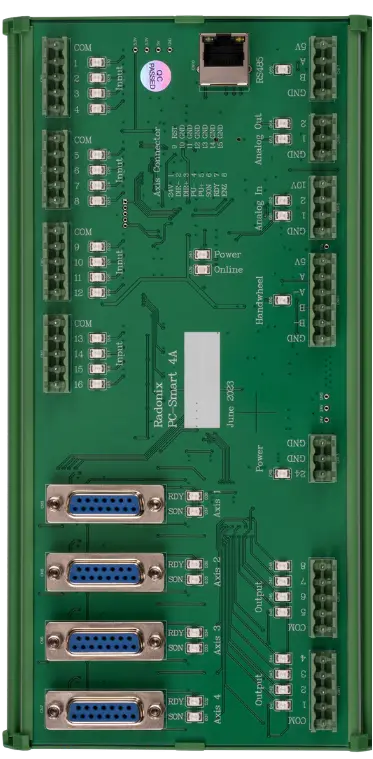
Inputs for SurfaceDetector, Home pins (X,Z), limits, door/guard, and E-stop.
Outputs for coolant/air as needed; Run / Pause / Stop with safe resume.
Software & Workflow
Scan mode: touch off the wheel, press Scan—the interface samples the rim/profile at a set ScanVelocity, applies SensorDisplace offset, and builds a repair path automatically.
DXF mode: load a DXF ring/profile; preview on the grid and apply pass parameters.
Multi-pass repair with Depth & DepthStep (e.g., 0.05 mm), controlled Feed, optional Overlap, and PenUp retracts at transitions.
Smoothing and Junction factors trim chatter at corners; per-axis V (mm/s) and L (mm) steps for tuning.
Live Absolute/Relative readouts, feed override, and Spindle panel for RPM control.
Key Capabilities
(at a glance)
Key Capabilities(at a glance)
Scan-to-path wheel repair (no CAD required)
DXF profile import with grid preview
Multi-pass depth control (Depth/DepthStep)
Smoothing, junction tuning, and overlap control
Spindle speed ramp (Start/End) with override
Surface detector/probe offset (SensorDisplace)
Safe Pause/Resume, job logs, and alarms
Standard Workflow
Home X & Z, set X0/Z0, and mount the wheel.
Choose Scan or Open a DXF profile; verify the preview on the grid.
Set Depth, DepthStep, Feed, Overlap/PenUp, and spindle RPM.
Dry-run if needed, then Run; adjust with the Speed override.
Inspect, repeat light passes if required, Save report.
Typical Specifications
| Area | Spec |
|---|---|
| Axes / Modes | X, Z linear with rotating spindle |
| Inputs | Surface detector, Home/Limit (X,Z), door/guard, E-stop |
| Pass Control | Depth, DepthStep, Feed, Overlap, PenUp |
| Scan | ScanVelocity, SensorDisplace offset |
| Spindle | RPM start/end ramp, on-screen override |
| ToolPath | Acceleration, TraverseVelocity, Smoothness, JunctionFactor |
| Reports | Run time, passes, alarms/stops, operator notes |