
- 4-Axis
- Used in Cutter, Laser and Plasma CNC machines

Videos
DESCRIPTION
The XYZA-Profile Laser Cut refers to a sophisticated CNC laser cutting system specifically designed to handle complex profiles across four axes: X, Y, Z, and A. This configuration significantly enhances the capabilities of laser cutting by incorporating advanced motion control and precision laser technology to execute intricate cuts on various materials.
- 4-Axis
- Used in Cutting CNC machines
Introduction
One-line value prop: 4-axis rotary laser cutting for tubes and profiles—precise XY motion, Z focus, and synchronized A-axis rotation with clean pierce, gas control, and kerf compensation.
Who uses it: Tube & profile fabricators, furniture and fitness equipment makers, HVAC/exhaust shops, job shops.
Works with: Rotary laser machines where the cutting head moves in X/Y/Z and the workpiece rotates on a chuck (A-axis)—continuous or indexed rotation.
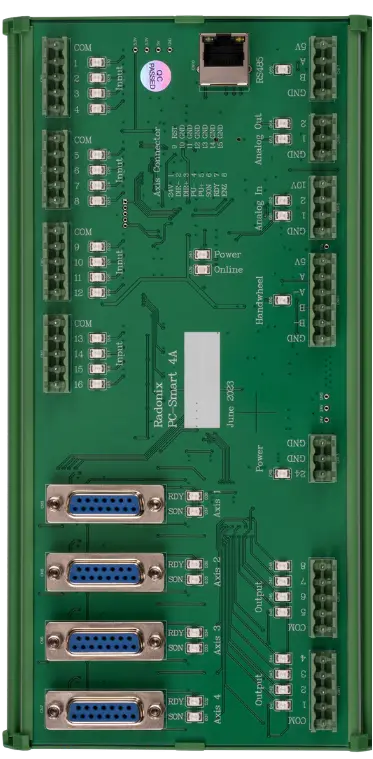
Compatible controllers: PC-SMART 4A / PC-SMART 3AS / PC-PRO LAN 4A
Supported files: DXF and standard G-code (e.g., ArtCAM / PowerMill posts)
Important: This interface does not include auto-focus for flat sheets. Focus is set via manual Z or a fixed offset.
Machine & Kinematics
- 4-axis synchronized motion (typical tube laser: X/Y for cutting head path + rotary axis for tube rotation + Z/focus/height axis depending on machine design).
- The product is described as a 4-axis CNC laser controller.S-curve (S-type) acceleration/deceleration to reduce vibration and keep cut quality stable at corners and during fast direction changes.
- High feed capability (the listing family mentions max speed around 30 m/min), which drives requirements for: tight interpolation, look-ahead, and stable servo/stepper pulse generation
Control & I/O
Tube machines have lots of interlocks and peripherals (chucks, clamps, doors, gas, alarms, sensors). From the listing family:
Plenty of isolated I/O: examples show ~16 outputs / 20 inputs with photoelectric isolation.
What this typically must cover:Chuck clamp/unclamp, front/rear chuck coordination
Limit switches, home switches, pressure switches (assist gas), water chiller OK, laser ready, alarm chains
Door/cabinet interlocks, E-stop chain, servo alarms, lube, pneumatic valves, vacuum/extraction permissives
Software & Workflow
-
Import DXF/G-code, set tube diameter and start angle; automatic unwrap/wrap to A-axis.
-
Lead-in/lead-out styles, kerf/offset, corner slow-down, tabs/micro-joints, seam-skip.
-
Pierce strategy: pre-flow, dwell (CutTime), post-flow; water/air purge and gas changeovers.
-
Rotation/length nesting for multiple parts along a bar; simulation & dry-run (laser OFF).
-
Resume from last G-code line with safe re-entry; job logging (time, length, pierces, alarms, notes).
Key Capabilities
(at a glance)
Key Capabilities(at a glance)
XYZA interpolation with rotary unwrap/wrap
Pierce & gas control (pre/post flow, dwell, purge)
Kerf compensation, lead-in/out, tabs, corner rules
Park points (P1/P2), seam alignment, diameter-aware paths
Dry-run, single-block, and line-based resume
Standard Workflow
Load DXF/G-code and confirm the diameter / unwrap settings.
Set origin, A-axis zero, and verify clamp/park points.
Apply kerf, lead-in/out, pierce & gas rules; add tabs if needed.
Simulate / Dry-run to check limits, rotation, and order.
Run the job; monitor pressure/ready; use single-block for trials.
If stopped, resume from last line; export the automatically saved job report.
Typical Specifications
| Area | Spec |
|---|---|
| Axes | X, Y, Z, A (rotary chuck) |
| Modes | CW / Pulsed laser; multi-gas assist control |
| Files | DXF, G-code |
| Piercing | Pre-flow, dwell (CutTime), post-flow; pulse ramp; purge/bleed |
| Compensation | Kerf/offset, lead-in/out, corner slow-down, tabs |
| Alignment | Tube diameter, A-zero & rotation shift; P1/P2 park points |
| Safety | Doors/guards, gas pressure OK, chiller/laser ready, E-stop, SafeZ |
| Recovery | Restart from last G-code line, safe re-entry |
| Reporting | Time, cut length, pierces, pauses/alarms, operator notes |
Key Features of Radonix CNC Software
For a tube laser controller, the motion controller is only half the story; you also need real-time laser process signals:
Layer-based process parameters (per layer: speed, power %, frequency, piercing settings, corner handling). This is a standard pattern in tube-laser control software.
Dynamic power and/or frequency adjustment while moving (to keep kerf consistent during acceleration/corners).
Pierce control / punch tables (timers, staged pierce, step times).
Corner processing parameters (slowdown, duty ratio, follow distance, etc.) to avoid overheating and corner blowout.