
- 3-Axis
- Used in Cutter and Water Jet CNC machines
Videos
DESCRIPTION
XYZ Water Jet Interface revolutionizes industrial CNC cutting with its advanced multi-axis precision that allows for intricate cuts and exact angles across various materials. Integrating direct CAD compatibility, the interface streamlines workflows by eliminating manual G-code generation, ensuring efficiency and accuracy. Equipped with real-time adjustable cutting parameters and safety features, the Radonix interface enhances both operator safety and material utilization. This eco-friendly system uses water and natural abrasives, making it a sustainable choice for industries requiring the highest quality in precision cutting, from aerospace to fine arts
- 3-Axis
- Used in Cutting CNC machines
Introduction
One-line value prop: Import a DXF, set pierce timing, choose Low/High Pressure and Abrasive mode, and cut accurately while Z maintains safe standoff and the interface sequences pump, valves, and feeds automatically.
Who uses it: Metal & composite job shops · gasket makers · stone/glass processors · prototyping & education.
Works with: 3-axis gantry waterjets with an HP pump (intensifier or direct-drive), abrasive feeder, and Z lifter.
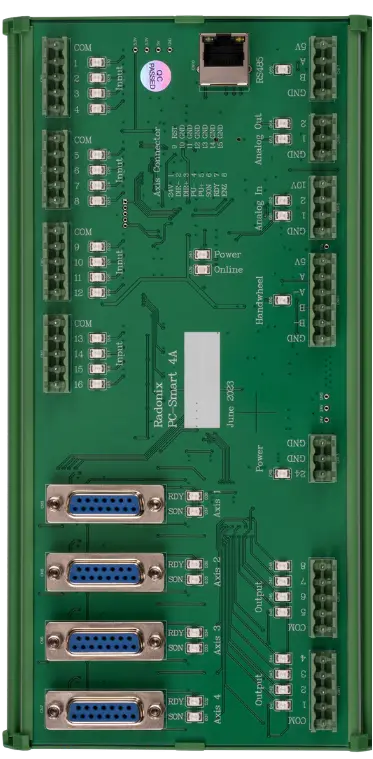
Compatible controllers: PC-SMART 4A / PC-SMART 3AS / PC-PRO LAN 4A
Supported files: DXF and standard G-code (e.g., ArtCAM / PowerMill posts)
Machine & Kinematics
-
3-axis contouring (X, Y, Z) with homing and soft limits; work offsets
-
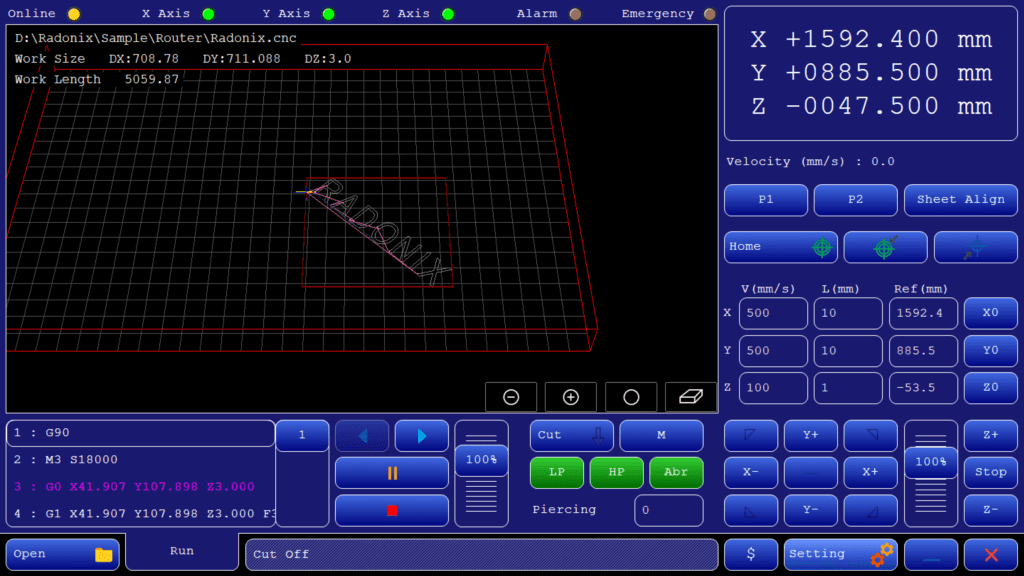
Two programmable positions (P1 / P2) for quick park, tool change, or fixture points.
-
Sheet Align to rotate/shift the program to the clamped sheet with one reference move.
Control & I/O
-
Pump and head control: HP / LP water, Abrasive ON/OFF, purge/bleed, torch/head enable, guards & Emergency.
-
Inputs: home/limits, pump ready, pressure OK, door/guard, optional height/touch sensor.
-
Operator aids: Speed % override, Pause/Resume, Jog (continuous or incremental), Restart from line (power-loss recovery).
Software & Workflow
DXF import with preview, kerf/offset, lead-in/lead-out, tabs, inner→outer ordering, and corner slow-down.
Pierce strategies: LP (water-only) pierce → ramp to HP + Abrasive; configurable Pre-Cut (pre-flow), Cut timing base, and Post-Cut (post-flow).
Dry-run (water off) to validate order, clearances, and keep-outs, then Run with live overrides.
Automatic job report (time, path length, pierces, pauses/alarms, operator notes).
Key Capabilities
(at a glance)
Key Capabilities(at a glance)
Direct DXF execution (no external post needed)
Low/High-pressure modes and Abrasive control from the HMI
Programmable pierce timing (pre-flow / dwell / post-flow)
Kerf compensation, clean leads, micro-tabs, and corner smoothing
Sheet Align rotation/shift to the clamped sheet
SafeZ retracts, feed overrides, Pause/Resume, and Restart from line
Standard Workflow
Home X/Y/Z → set X0/Y0/Z0 and verify SafeZ.
Open DXF → set kerf, leads, tabs, and corner slow-down.
Configure Pre-Cut / Cut / Post-Cut times; choose LP/HP and Abrasive.
Dry-run (water off) to check order and clearances → adjust Speed % if needed.
Run—system sequences pump/valves automatically; pause safely for inspection or reposition.
If interrupted, use Restart from line, confirm SafeZ and re-entry, and resume.
Inspect parts and save the run report.
Typical Specifications
| Area | Spec |
|---|---|
| Axes | X,Y,Z |
| Modes | DXF revolve to 3D, multi-pass rough/finish, RPM control |
| Files | DXF (primary), G-code (optional) |
| Piercing | N/A → Turning: step-down, pass count, direction (FWD/BWD/Both) |
| Compensation | Junction smoothing, velocity planning, SafeZ retracts |
| Alignment | P1/P2 quick points, origin tools, 3D preview verification |
| Safety | Guard/door, spindle ready, tailstock clamp, E-stop, SafeZ |
| Recovery | Restart from last line; safe RPM and clearance restore |
| Reporting | Time, path length, passes, pauses/alarms, notes |
Key Features of Radonix CNC Software
🔹 Direct DXF Execution
Seamlessly load and execute DXF files without the need for G-code conversion — streamlining your workflow and reducing setup time.
🔹 Smart Component & Path Management
Select specific parts from complex drawings and customize cutting order with intuitive control over toolpath sequencing.
🔹 Interactive On-Screen Editing
Scale, rotate, and mirror parts directly within the interface — with live toolpath previews to ensure precision.
🔹 Flexible Part Placement
Manually drag and drop parts onto your material sheet to accommodate irregular shapes, pre-cut stock, or remnant reuse.
🔹 Advanced Pause Controls
Set up to three independent pause points — before the cut, during the cut, and after the cut — for manual checks or operational adjustments.
🔹 Reverse Cutting Mode
Execute toolpaths in reverse to minimize material warping or adjust final exit points based on design needs.
🔹 Simulation / Demo Run Mode
Perform a complete motion test without activating the torch. Ideal for verifying the toolpath before live cutting.
🔹 Cylindrical Cutting Capability
Project flat designs onto cylindrical surfaces for precision tube and pipe cutting operations.
🔹Abrasive feeder control:
Enable/disable abrasive and, where supported, set the feed rate from the HMI.
🔹Automatic standoff control:
Z lifter/height sensor keeps a constant nozzle-to-work gap for consistent kerf and quality.