
- 3-Axis
- Used in Cutter, Plasma and Pipe Cutter CNC machines
- Feature: Torch Height Control (THC)

DESCRIPTION
The XYZ-Plasma-Pipe interface is a specialized solution designed for precision plasma cutting of pipes. This interface enables seamless control over the cutting process, ensuring high accuracy and adaptability for various pipe diameters and materials. A key feature of this interface is the Torch Height Control (THC) system, which dynamically adjusts the torch’s distance from the pipe surface during the cutting process. This ensures consistent cutting quality by compensating for any pipe irregularities or deviations. With its user-friendly design and advanced features, the XYZ-Plasma-Pipe interface simplifies complex operations, enhances productivity, and guarantees exceptional results for industrial applications requiring precise pipe cutting.
- 3-Axis
- Used in Cutting CNC machines
Introduction
One-line value prop: Load a DXF, set Diameter, and cut tubes with kerf-accurate paths while THC holds a constant torch standoff on warped or thin material—clean edges, fewer stops.
Who uses it: Job shops, HVAC/ducting, handrail & furniture makers, maintenance/prototyping cells.
Works with: Gantry tables equipped with a pipe rotator/chuck or roller fixture.
Compatible controllers: PC-SMART 4A / PC-SMART 3AS / PC-PRO LAN 4A
Supported files: DXF and standard G-code
Important: This interface does not include Torch Height Control (THC).
For live arc-voltage height control, use XYZ Cutter + THC.
Machine & Kinematics
X–Y contouring + Z lifter with homing and soft limits; presets for Pierce / Cut / Retract.
PipeCut mode unwraps DXF geometry to the tube circumference using Diameter—handles miters, saddles, slots, and holes.
Compatible with chucks/rotators (step/dir or encoder feedback) and tailstock prompts
Control & I/O
-
Torch/gas I/O: Torch ON/OFF, Pre-flow / Post-flow, alarms/beacons, guards/doors, Emergency.
-
Process inputs: Arc-OK, ohmic/mechanical touch sensor, anti-collision, home pins.
-
THC loop: drives Z (pulse/dir) to match TorchValue (target V) using THCGain and Tolerance (deadband) with enable/hold conditions (StartAfter, EndBefore, THCThreshold).
-
Operator aids: Manual Z trim, Speed % override, safe Pause/Resume retract.
Software & Workflow
DXF import with preview; kerf/offset, lead-in/lead-out, pierce dwell, micro-tabs, corner slow-down.
Switch to PipeCut, set Diameter, confirm inner→outer order and clamp/tailstock keep-outs; dry-run (torch off).
Set THC (Target V, Gain/Deadband, delays); Run—Z is regulated automatically; trim Z or pause safely when needed.
Run reports record time, cut length, pierces, pauses/alarms, and operator notes.
Key Capabilities
(at a glance)
Key Capabilities(at a glance)
-
Diameter-based wrap of DXF to pipe surface
-
Kerf compensation, clean leads, micro-tabs, inner→outer sequencing
-
Automatic standoff with configurable Target V, Gain/Deadband, and enable/hold logic
-
Manual Z trim, Speed override, safe Pause/Resume
-
Dry-run simulation and full interlocks
-
Job logging for repeatability
Standard Workflow
-
Home X/Y/Z, clamp tube; set X0/Y0.
-
Open DXF → PipeCut → Diameter.
-
Set kerf/leads and pierce timing; Dry-run to validate.
-
Run; adjust Speed % and Z trim if required.
-
Inspect parts and save the report.
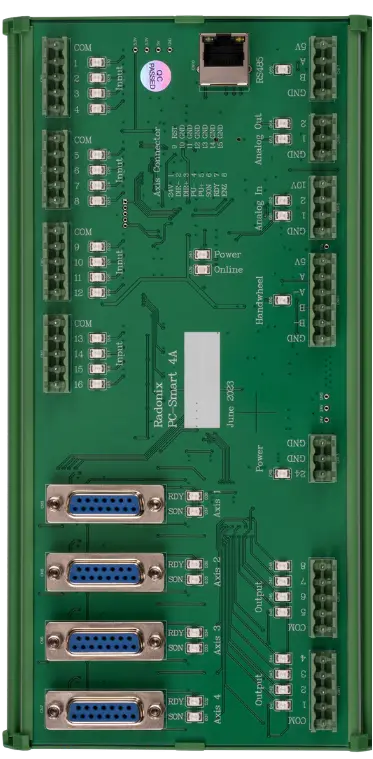
Typical Specifications
| Area | Spec |
| Axes / Modes | XY (optional Z lifter); No THC |
| File Formats | DXF, standard G-code |
| Compensation | Kerf/offset, corner smoothing, arc tolerance |
| Performance | High look-ahead planner; steady velocity on arcs |
| I/O | Torch, gases, beacons, safety relays |
| Work Offsets | Multiple origins for sheet/remainder reuse |
| Reports | Time, cut length, pierces, alarms, notes |
Key Features of Radonix CNC Software
🔹 Direct DXF Execution
Seamlessly load and execute DXF files without the need for G-code conversion — streamlining your workflow and reducing setup time.
🔹 Smart Component & Path Management
Select specific parts from complex drawings and customize cutting order with intuitive control over toolpath sequencing.
🔹 Interactive On-Screen Editing
Scale, rotate, and mirror parts directly within the interface — with live toolpath previews to ensure precision.
🔹 Flexible Part Placement
Manually drag and drop parts onto your material sheet to accommodate irregular shapes, pre-cut stock, or remnant reuse.
🔹 Advanced Pause Controls
Set up to three independent pause points — before the cut, during the cut, and after the cut — for manual checks or operational adjustments.
🔹 Reverse Cutting Mode
Execute toolpaths in reverse to minimize material warping or adjust final exit points based on design needs.
🔹 Simulation / Demo Run Mode
Perform a complete motion test without activating the torch. Ideal for verifying the toolpath before live cutting.
🔹 Cylindrical Cutting Capability
Project flat designs onto cylindrical surfaces for precision tube and pipe cutting operations.
🔹 Live Arc-Voltage Monitoring
Real-time arc-voltage feedback ensures dynamic Z-axis height control — maintaining optimal torch-to-material distance during operation.