
- 3-Axis
- Used in Cutting, Laser, Plasma, Flame Cut, Water Jet CNC machines
- For Machines with Z-Axis Motors
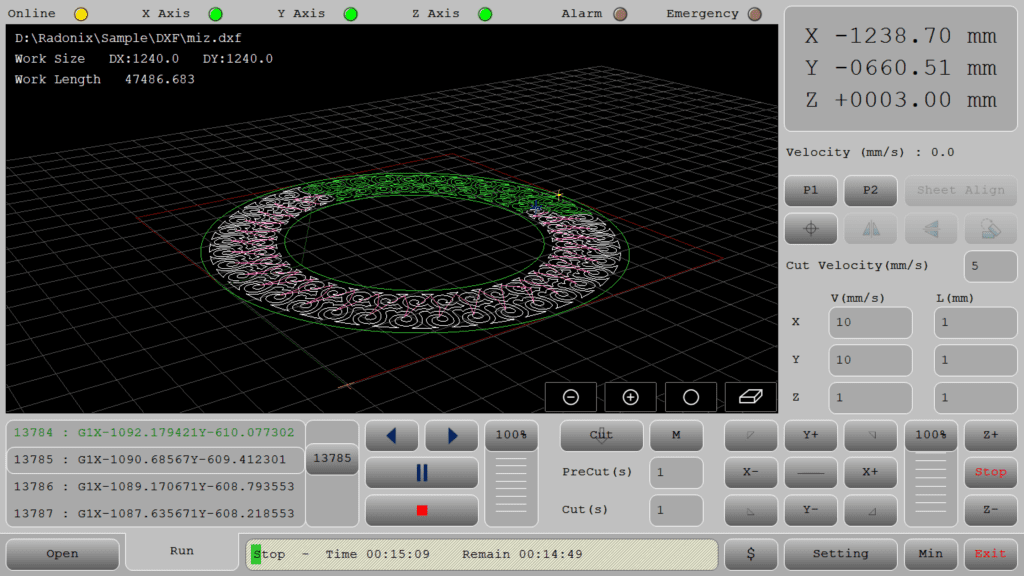
DESCRIPTION
The XYZ-Cutter interface is designed for machines equipped with Z-axis motors, including stepper motors and servo motors.
Automatic Z-Axis Height Control
The Z-axis height can also be controlled automatically using smart height control, enabling this capability.
Z-Axis Movement During Operation
In this interface, the operator can move the machine’s Z-axis, which is connected to one or more servo or stepper motors, using physical buttons or designated keys on the interface marked with +Z and -Z. It should be noted that the Z-axis is not part of the G-Code, so the operator can adjust the Z-axis height i.e., the distance between the torch tip and the workpiece during cutting as needed.
Introduction
Machine & Kinematics
XY gantry + Z lifter for torch height moves; configurable work envelope with homing and soft limits.
Preset pierce height / cut height / retract moves; safe approach and park macros.
Supports magnetic breakaway, sheet sensors, and E-stop chain.
Control & I/O
-
I/O mapping for torch on/off, gas/oxygen valves, purge, alarms/beacons, and safety interlocks.
-
Pierce dwell and gas pre-flow/post-flow timers; Pause/Resume with position hold.
-
Live Absolute/Relative readouts, feed-rate override, and per-axis jog/step controls.
Z-Axis Options
1) XY Cutter — Z via DC Motor (Up/Down outputs)
Use when: You have a simple lift driven by a DC motor (no step/dir).
How it works: Digital outputs jog the lift: C-Zfree = +1 → Z Up, C-Zfree = −1 → Z Down (timed macros to reach pierce/cut heights).
Ideal for: Basic plasma/oxy tables with fixed standoff or occasional manual nudging.
Notes: No pulse/dir, no encoder/THC—operator or sequence toggles outputs.
2) XYZ Cutter — Z via Stepper/Servo (Manual mode)
Use when: You want precise Z positioning but prefer to trim height manually during the cut.
How it works: Pulse/Direction control on Z; operator adjusts Z from the screen/pendant while the toolpath runs (store pierce/cut height macros, home & soft limits).
Ideal for: Shops needing accuracy without arc-voltage automation.
3) XYZ Cutter + THC — Z via Stepper/Servo (Automatic mode)
Use when: You need automatic standoff on thin or uneven sheets.
How it works: The THC module reads arc voltage and closes the loop on Z to hold the target height (set target V, gain/deadband, anti-dive, sample/hold on corners).
Ideal for: High-precision plasma cutting, long cuts, warped material.
Software & Workflow
DXF/G-code import with on-screen preview.
Automatic kerf/offset, lead-in/lead-out (arc/radial/tangent), corner slow-down, micro-tabs.
Ordering rules (inner→outer), clamp keep-outs, and dry-run (torch off).
Run reports: time, cut length, pierces, pauses/alarms; operator notes saved with the job.
Key Capabilities
(at a glance)
Key Capabilities(at a glance)
Kerf-accurate DXF/G-code cutting with clean leads
Operator Z trim during cutting; stored pierce/cut height macros
Inner→outer sequencing, micro-tabs, and clamp keep-outs
Dry-run, Pause/Resume, feed override, full interlocks
Job logging for repeatability
Standard Workflow
Open DXF/G-code and preview.
Home axes; set X0/Y0 and confirm pierce/cut heights.
Dry-run (torch off), check clamps and order.
Run; trim Z as needed; use Pause/Resume safely.
Save the run report and notes.
Typical Specifications
| Area | Spec |
|---|---|
| Axes / Modes | X, Y, Z (manual control; no THC) |
| Files | DXF, standard G-Code |
| Compensation | Kerf/offset, corner smoothing, arc tolerance |
| Leads | Arc, radial, tangent; pierce dwell & gas timing |
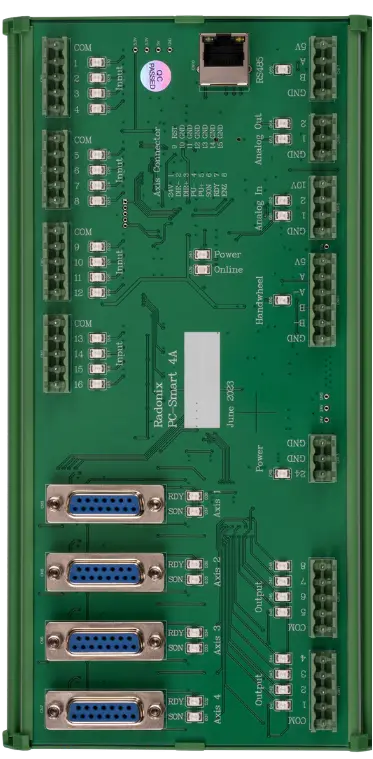
| I/O | Torch, gases, alarms/beacons, E-stop & guards |
| Readouts | Absolute/Relative positions, feed override |
| Reports | Time, cut length, pierces, pauses/alarms, notes |
Upgrade path
Need live arc-voltage height control? Choose XYZ Cutter + THC for automatic standoff management on uneven sheets.
If you want, I can paste this into your site/CMS or update the canvas draft to match this final version.
Key Features of Radonix CNC Software
🔹 Direct DXF Execution
Seamlessly load and execute DXF files without the need for G-code conversion — streamlining your workflow and reducing setup time.
🔹 Smart Component & Path Management
Select specific parts from complex drawings and customize cutting order with intuitive control over toolpath sequencing.
🔹 Interactive On-Screen Editing
Scale, rotate, and mirror parts directly within the interface — with live toolpath previews to ensure precision.
🔹 Flexible Part Placement
Manually drag and drop parts onto your material sheet to accommodate irregular shapes, pre-cut stock, or remnant reuse.
🔹 Advanced Pause Controls
Set up to three independent pause points — before the cut, during the cut, and after the cut — for manual checks or operational adjustments.
🔹 Reverse Cutting Mode
Execute toolpaths in reverse to minimize material warping or adjust final exit points based on design needs.
🔹 Simulation / Demo Run Mode
Perform a complete motion test without activating the torch. Ideal for verifying the toolpath before live cutting.
🔹 Cylindrical Cutting Capability
Project flat designs onto cylindrical surfaces for precision tube and pipe cutting operations.
🔹 Live Arc-Voltage Monitoring
Real-time arc-voltage feedback ensures dynamic Z-axis height control — maintaining optimal torch-to-material distance during operation.